Phone camera is the most vital thing these days, as everyone is on the internet and we all live to share our lives and journeys with people on the internet. If you want to stand out, you need your picture to be shinier than others, and that’s where LMC 8.4 came into play, as it brings various advanced DLSR-level photography controls and customization settings that turn an ordinary picture into an aesthetically pleasing art piece to bring more likes and attention to your photos.
LMC 8.4 is a professional manual camera app designed to work on non-Pixel devices, offering Google’s proven photo processing tech that fine-tunes the picture after you tap on the shutter button to give you the best possible output. When you launch the LMC8.4 app for the first time after installing it, many advanced features and tools are usually deactivated and require manual activation.
About LMC 8.4
Most individuals use the stock camera app and never try other ones, but the pre-installed camera apps are designed for basic photography. If you want to capture social media-ready shots and want to save your memorable moments in the best possible way, replace the default camera app with LMC 8.4, which is a sophisticated camera app that gives you more control to tweak numerous adjustments based on your current lighting situations to capture incredible shots anytime and get the most out of your device’s camera capability.
Access Noise Model
Noise Model adds a certain Anti-Noise code in the app that eliminated 90% of the digital noise and graininess that usually appears when taking photos in low light. These gains ruin the whole image quality, so using the Noise Model could be a huge help in capturing a superior quality image, even when the lights are not enough.
Enable Various Tools & Modes in ViewFinder
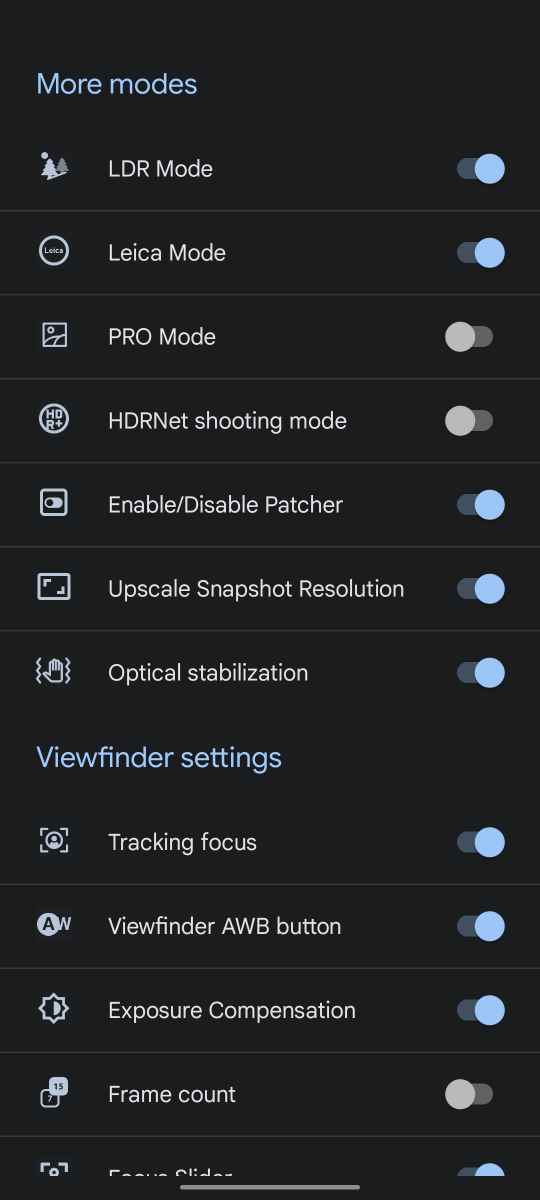
The app interface may lack option at the beginning because all the advanced tools and hidden, so swipe down in the viewfinder and navigate the app settings. Go to the Processing Function and select Viewfinder Settings. Here you can find the list of all tools and modes, so enable the ones you need. Don’t enable all of them because it could add too many options on the app screen that could be overwhelming, and you might end up not utilizing the right tool at the right time.
Use Config File
Config Files are the XML codes that make desired changes in the app on your behalf with just a few taps. Since the LMC 8.4 app is loaded with tons of features, many users may find it inconvenient and challenging to adjust various photography parameters and app settings, so there are various config files, each is designed for a unique photography need, so choose the one that fits well with your situation and apply it to get the best outcome in seconds. You can download the Config File for free from our website (from here).
Enable Sabre Algorithm
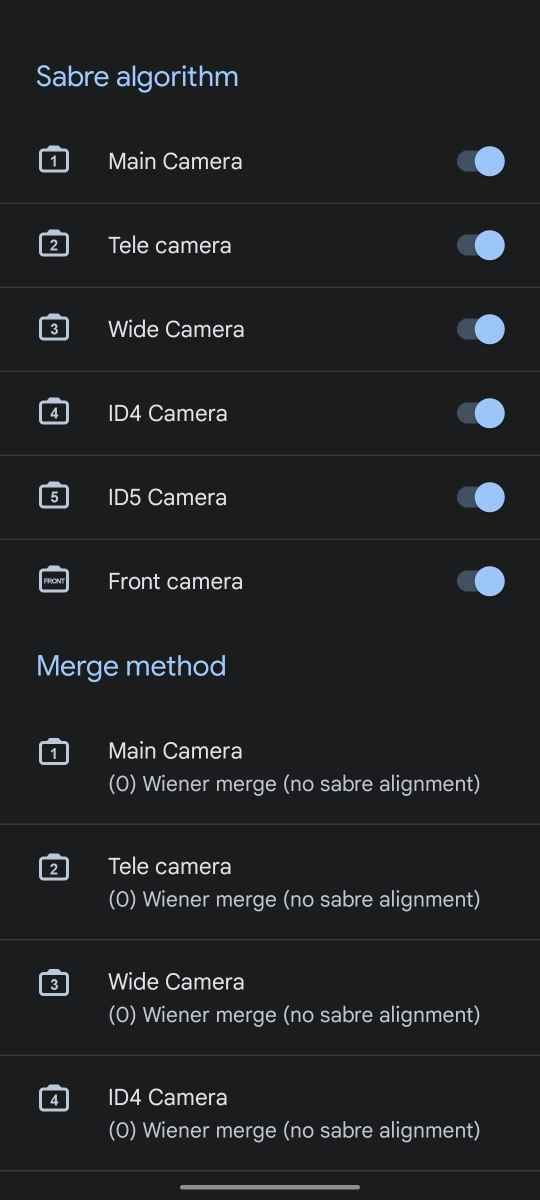
In the processing function setting, there is a Sabre Algorithm option which is to enhance photos in all modes on supported devices. SABRE stands for Super-Resolution Accumulation By Repeated Estimation. It is a part ov Google’s advanced image merging system and isused mainly for HDR and zoom processing. This is a significant and key setting on LMC 8.4 that you must be aware of to be able to make good use of it and get some positive output, so enable this algorithm for all camera son your device and choose the desired method. This mode processes multiple frames, improving sharpness, reducing noise, enhancing faded details, and improving digital zoom quality.
HDR+ Control
Increasing the dynamic range helps in a major way most of the time to boost the color vibrancy, make the overall image more lively, shiny, and attractive, but many times like when you’re trying to capture a moving subject or if the lighting is already good enough, you should avoid using the HDR mode as it could backfire and downscale the image outcome. Go to the Settings of the LMC 8.4 app and scroll down to the Advanced section, then make sure you toggle on the HDR+ control option that enables a toggle option in the viewfinder so you can have the control of enabling or disabling HDR mode. If this option is disabled, HDR remains active all the time.
Conclusion
LMC 8.4 is an incredible camera app, and you can capture some of the best shots looks byond imagine from your normal Android phone, but this could only be possible if you use this app’s capabilities well. Mentioned above are some of the advanced features that you get with this app that you have to unlock manually and then you could use them to bring more fun into your photography.
